


For multi-location groups
Every branch, one login.
See all your locations side by side, manage your team and menu across branches, and ask the AI assistant questions about the whole group.
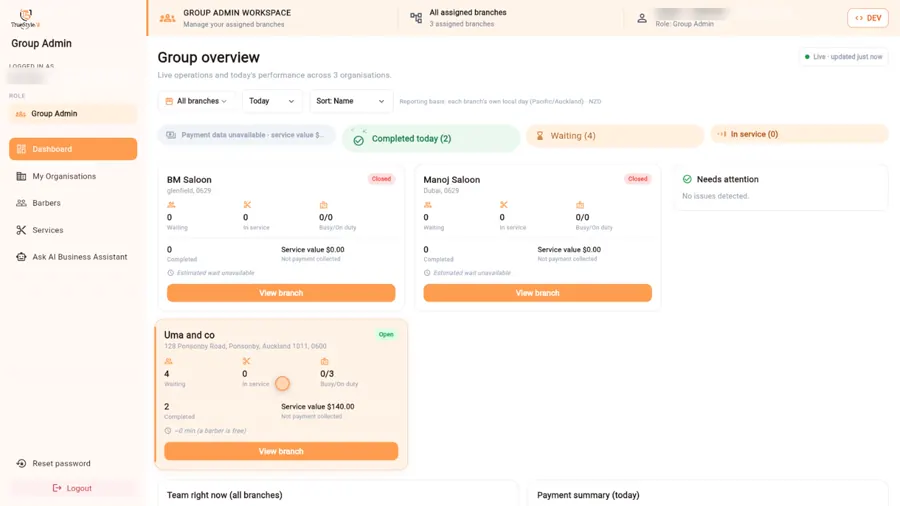
Group overview
Spot the busy branch before your customers do
Today’s waits, completed visits, service value and who’s on duty at every branch — live. Click into any branch for the full picture, just as its own team sees it.
AI across the group
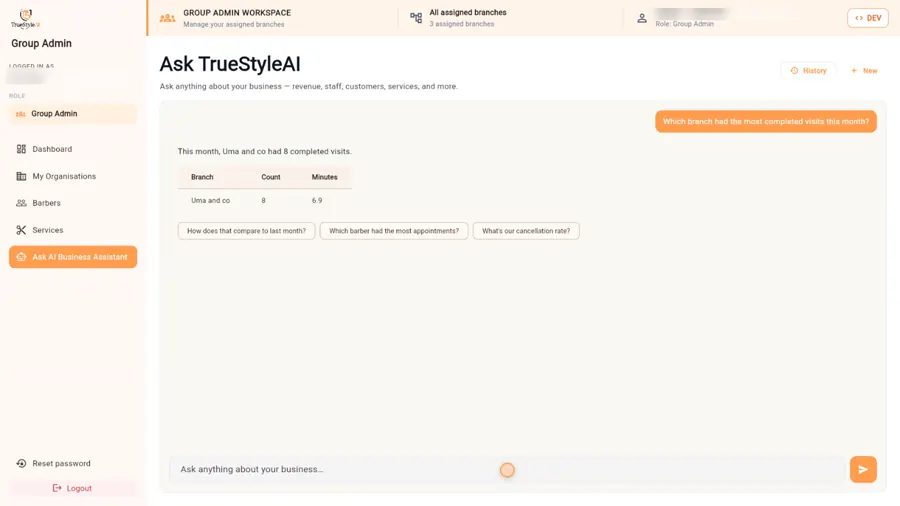
Questions about the whole business
“Which branch had the most completed visits this month?” Answers across every location, from your own data.
Built for groups
Consistent, everywhere
My Organisations
Every branch, its address, its team and its queue.
Barbers across branches
Your whole team, who works where, and who’s on duty now.
One menu
Services and prices kept consistent across locations.
Questions
Running a group on TrueStyleAI
Who can see what across branches?
Group owners see every branch side by side. Branch admins see their own branch, and stylists see their own queue and clients — each person only sees their own workspace.
What can the AI assistant answer for a group?
Questions about your own data across every location — for example which branch had the most completed visits this month, or where waits are building today.
Can I keep services consistent across locations?
Yes. Manage your team and menu across branches so services and prices stay consistent everywhere.
How is a multi-location group priced?
Groups get a plan tailored to the number of branches. Book a group demo and we’ll set up your branches with you.
Can I start with one location first?
Yes. Start the free 30-day trial with one location, then book a group demo when you’re ready to bring the other branches in.
Running more than one salon?
Book a group demo and we’ll set up your branches with you.